GLB Texture Editor
Edit a GLB model's materials and textures in the browser, then export it.
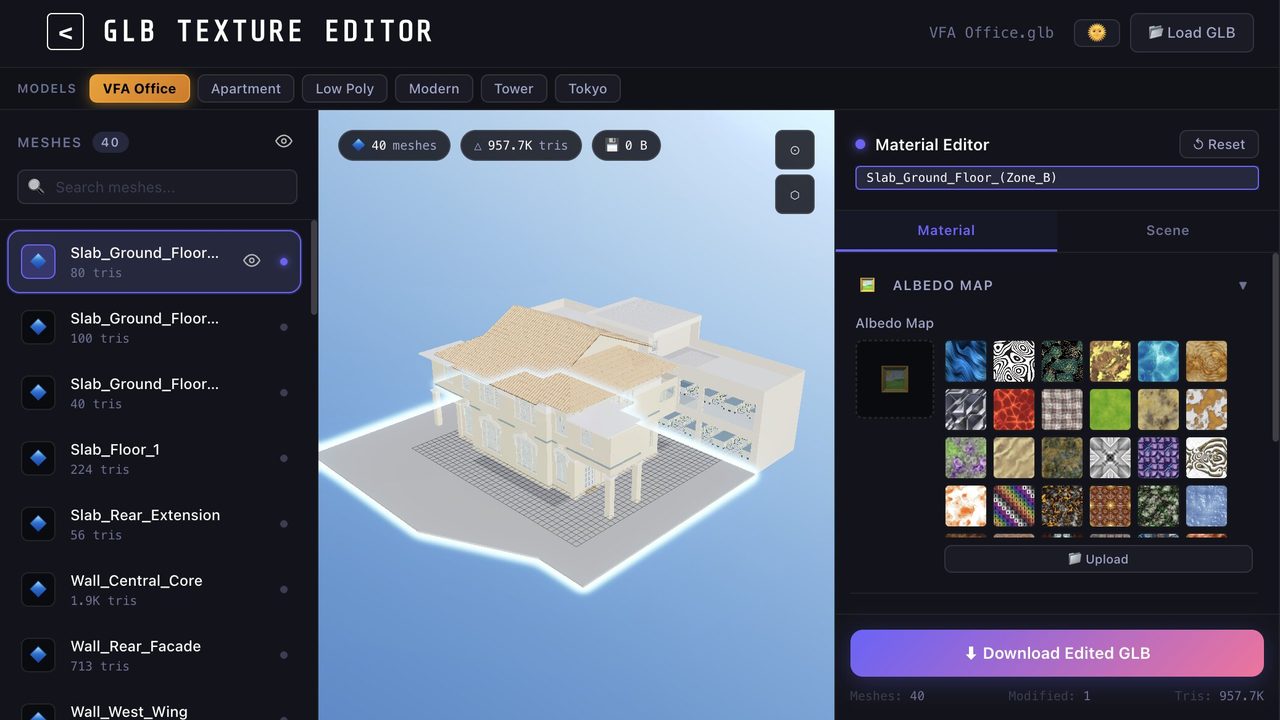
Drop in your own GLB or start from six building presets. Adjust the look with about 60 textures and HDRI lighting.
How it works
Per-mesh materials
Colour, roughness, metalness and UV projection, plus normal and AO maps.
Lighting and sky
HDRI, procedural sky, tone mapping, bloom and shadows.
Save the edited GLB
Download your changes as a GLB and use it in other tools.
Where it fits
Design review
People without CAD software can see the same model and comment.
Proposals and quotes
Show the shape a drawing cannot convey, on the spot.
Training and manuals
Teaching material where structure and motion are learned by touching.
We build this demo out to fit your work.
The demo is a starting point, not a finished product. We customise it for your data and your setting.
Fixed-scope development
For when requirements are clear. We customise a demo to your data and workflow and deliver it.
Dedicated lab team
For when the shape is still open. A dedicated team prototypes and tests with you until the spec is clear.
Embedding
Because everything is built for the web, it can be embedded into your existing systems and apps.
Related articles
Start with “can this be done?”
You do not need a spec. Tell us what data you have and what you want to do with it.